NTFS Stuff v1 – Eng
VBS WSH Script
Authors: Mirko Iodice, Luca Alberti
Tested on: Windows 2000 Server, Windows 2003 Server, Windows 2008 Server, Windows XP Professional, Windows Vista, Windows 7, Internet Explorer 6, Internet Explorer 7, Internet Explorer 8, Mozilla Firefox 3.X
What is NTFS Stuff?
It is hard for a Microsoft System Administrator to keep trace of all changes made to the "logical" structure of a fileserver, so many times we felt the need for a quick and easy tool that could help us to locate those "significant" folders that, in some way, affect the normal application of NTFS permissions based on the "inheritance" principle.
NTFS Stuff is an useful WSH script, written to be used on a fileserver, that generates an HTML report which displays the NTFS access permissions structure. Two different "verbosity" levels make possible to display only the details of "significant" folders or those of the entire folders tree. In addition to the DACL of each single folder the resultant report shows other information, such as: creation date, last modified date, owner, NTFS inheritance.
We have paid particular attention to the graphical representation of information, colours and symbols make easier to note changes in the normal application of NTFS permissions, precisely based, as we said before, on the “inheritance” principle.
The following screenshot highlights the main features of this script
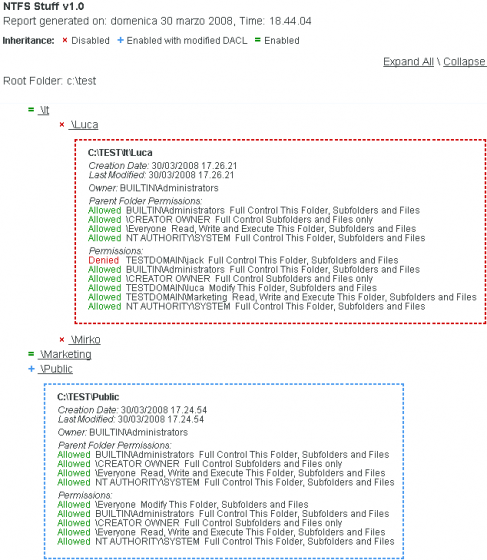
- The details of each folder are hidden by default, it is possible to display them by clicking on their names; these details include: full path, creation date, last modified date, owner, DACL (both Allow and Deny options).
- "Expand All" and "Collapse All" links allow to display or hide all the details with a single mouse click.
- Inheritance state is highlighted by colourful symbols.
A green "=" means that permissions are inherited and not modified; folders identified by this symbol are not significant.
More important are instead "x" and "+" symbols, respectively red and blue. A red "x" means infact that inheritance is turned off, while a blue "+" means that there are some differences between the permissions of the folder and those of its parents (inheritance is turned on anyway). - To make the output more readable, the details section of folders identified by "x" and "+" symbols displays also the parent folder's permissions.
- There is the chance to set two different execution methods: with "verbosity = 0" (default) only the folders identified by symbols "x" and "+" are displayed; with "verbosity = 1" the complete folders structure is displayed, graphically represented with the use of indentation.
- To offer more control is possible to specify the number of sub-levels (recursion) that have to be analyzed starting from the root folder; this feature can also reduce the execution time.
Recommendations
NTFS Stuff, only if started on Windows 2000, prompts the user for a task priority level (1 by default). This setting is used to limit the cpu usage during the execution. It is recommended to not set the 0 level when using this script on production servers or old computers, this is because the WSH Engine normally uses the most of the machine resources and this setting could cause a system freeze. Windows XP/2003 or higher are not affected by this problem, on these systems the script is able to automatically change his task priority level to "low", in this way the resource allocation is left to the operating system.
We noticed that is impossibile to correctly view the output file on Windows Server 2003 systems with the "Internet Explorer Enhanced Security" feature turned on. To fix this problem is necessary to add about:internet in the IE Trusted Sites Zone.
DACL Legend
NTFS Stuff uses functions took from XCACLS.VBS (Windows Support Tools) to display the NTFS permissions in a more readable format.
To understand special permissions refer to the following legenda.
General:
F = Full control
M = Modify
X = read & eXecute
R = Read
W = Write
Advanced:
E = Synchronize
D = Take Ownership
C = Change Permissions
B = Read Permissions
A = Delete
9 = Write Attributes
8 = Read Attributes
7 = Delete Subfolders and Files
6 = Traverse Folder / Execute File
5 = Write Extended Attributes
4 = Read Extended Attributes
3 = Create Folders / Append Data
2 = Create Files / Write Data
1 = List Folder / Read Data
The command line interface
The command line interface makes possibile to run NTFS Stuff remotely via "psexec" or locally as a scheduled task.
To get to the help screen open a command prompt and run "ntfsStuff.vbs" using the "cscript.exe" scripting engine and providing an input argument of your choice (for example the "?" character), for example:
cscript ntfsStuff.vbs ?
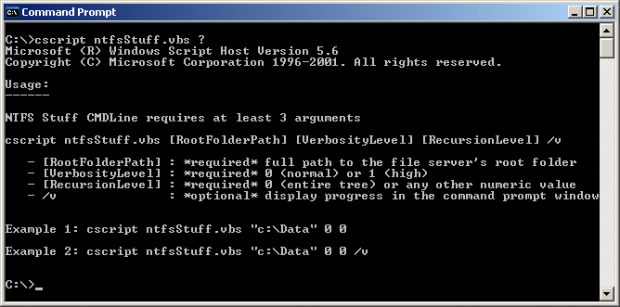
On Windows 2000 an additional argument named [PriorityLevel] is required
- The argument [RootFolderPath] is required and identifies the path which contains the folders to analyze.
- The argument [VerbosityLevel] is required and identifies how much information the graphical report should contain, a "0" value causes the display of the interesting/relevant folders only, "1" value causes the display of all the existing folders (the entire directory tree), even not interesting ones.
- The argument [PriorityLevel] (required and available only on Windows 2000) identifies the task priority level assigned to the script, the possible values are "0", "1" and "2", they respectively indicate the "low", "normal/moderate" and "high" task priority levels.
- The argument [RecursionLevel] is required and identifies the number of sub-levels (recursion) that have to be analyzed starting from the root folder, the value of "0" cause the analysis of the entire directory tree.
- The argument [/v] is optional and by activating it is possible to track the progress of the script.
Examples:
cscript ntfsStuff.vbs "c:\Data" 0 0

cscript ntfsStuff.vbs "c:\Data" 0 0 /v
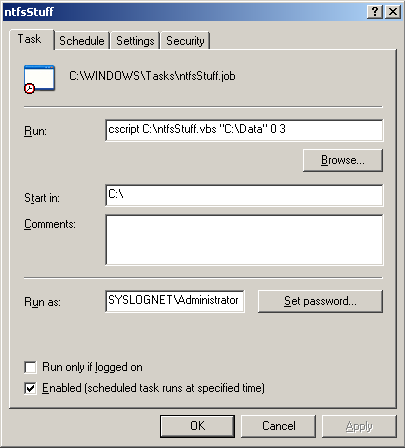
The command line also allows you to schedule the script execution via Windows scheduled tasks and to run it against remote servers using the psexec utility.
Example of remote execution via psexec:
psexec \\remote_server cscript C:\ntfsStuff.vbs "C:\Data" 0 0 /v
NTFS Stuff and UAC (User Account Control)
NTFS Stuff is able to automatically request an elevation of privileges when running on operating systems that support and make use of the User Account Control feature (Windows Vista, Windows 7, Windows 2008 Server).
Note: For obvious reasons, the elevation can be obtained automatically only when the script is running in graphical mode, to obtain administrator privileges when running via scheduled tasks or interactive via the command line you must use services or processes (for example: the command prompt) previously "runned as" Administrator.
For remote execution using "psexec" you must authenticate using the "built-in" administrative user (usually "Administrator") or disable the UAC access token filtering security feature.
Known Issues
Folders created by macintosh systems, especially those named with the use of special characters, can cause an unexpected error.
On Windows 2008 Server the script can cause an high CPU utilization by the processes lsass.exe and wmiprvse.exe.
Download
Changelog
- ntfs Stuff v1.0 - initial release
- ntfs Stuff v1.1 - fixed a CSS bug on Internet Explorer 8 and Firefox 3.5, new function added for better performance on Windows XP/2003 or higher
- ntfs Stuff v1.2 - folders that return an "Access Denied" error no longer cause the script to freeze/quit, added the ability to scan a whole drive starting at the root without the need to input a folder, Windows 2008 UAC bugfix (thanks to Helios Ciancio for feedback and source code), fixed a "Set Root Folder" input box bug, fixed some minor HTML bugs.
- ntfs Stuff v1.3 - new command line interface: starting from this release it is possible to run "ntfsStuff.vbs" via the command prompt using the "cscript" scripting engine, this feature makes possibile to run NTFS Stuff remotely via "psexec" or locally as a scheduled task. UAC support: NTFS Stuff is able to automatically request an elevation of privileges when running on operating systems that support and make use of the User Account Control feature (Windows Vista, Windows 7, Windows 2008 Server). "Access Denied" error handling further improved. Performance improvements: useless loops have been removed in order to improve the script execution speed.
References
- http://www.microsoft.com/te....c=it
- http://msdn2.microsoft.com/en....85).aspx
- http://msdn2.microsoft.com/en....85).aspx
- http://msdn2.microsoft.com/en....85).aspx
- http://www.microsoft.com/te....007.mspx
- http://kbalertz.com/88386....ervice.aspx
Author
Mirko Iodice
mirko -at- notageek (.dot) it
Suggeriti dall'autore
- Mettere ordine alle autorizzazioni di un File Server utilizzando NTFS Stuff v1
- WSH - Windows Scripting Host
Print This • Email this • Twit This! • Add to del.icio.us • Share on Facebook • Digg This! • Stumble It! • AddThis! • Share on Segnalo Alice • Share on OKNotizie
 Mirko Iodice
 mirko -at- notageek (.dot) it


22 Gennaio 2009 alle 11:48
niiiiiiiiice ... this is exactly the idea i had ... great tool!
tip: it would be nice if you couldd specify an option to resolve ad groups to user names; when i click on a group, i'd like to se a (recursive) box within the permission box with the members of the specified group
23 Gennaio 2009 alle 8:33
@Milan
Thanks for your feedback, is really appreciated.
Due to the low amount of feedbacks we are not planning to release an improved version of this script but if we will, I think that we can easily add this functionality of resolving group membership.
28 Gennaio 2009 alle 17:44
Firstly, I would like to thank you for creating this script and to say this is a wonderful script. Could you please update it to support Cyrillic text? I have a folder structure with folder names in English and Russian (Cyrillic) and the script errors with the following error. I have no scripting knowledge and therefore have no idea how to fix it. Could you please help?
Script: C:\ntfsStuff.vbs
Line: 439
Char: 5
Error: Invalid procedure call or argument
Code: 800A0005
Source: Microsoft VBScript runtime error
30 Gennaio 2009 alle 8:56
In the next few days we will try to develop a patch/fix to support cyrillic text. honestly I don't even know how to write this kind of characters but... I will give it a try ;-)
2 Febbraio 2009 alle 22:52
@ Oscar Lewis
at line 144 of ntfsStuff.vbs change
"Set ObjLog = ObjFSO.CreateTextFile(logfile, ForWriting)"
with
"Set ObjLog = ObjFSO.CreateTextFile(logfile, ForWriting, 1)"
without quotes, obviously.
I think that this simple fix could solve your problem, please let me know if it's ok.
3 Febbraio 2009 alle 11:12
Thanks a lot, it is running now and it looks like it works perfectly.
4 Marzo 2009 alle 13:08
Thanks for the script - it is really helpful.
One more to the wish list - it would be great to have export to csv files, for axample, ore raw per permission (so for every folder may be several records): path,folder level, ACL name, permission,inheritance flag). This could help with automation.
5 Marzo 2009 alle 23:45
@ Sergio
Thank you, we really appreciate the positive feedbacks and suggestions. Regarding the "export to csv" feature... don't get me wrong on this but I don't support this idea simply because my opinion is that the purpose of this tool is not only to list folder's permissions. It was made with the idea of highlighting in a visual way the role played by these permissions inside the entire folder's structure.
20 Aprile 2009 alle 17:50
It would have been really nice to export to a CSV AND resolve usernames from groups - this would save me months being a REAL novice and scripting :)
11 Ottobre 2009 alle 11:13
Its really one of the best tools i have seen.
Thank You!
11 Ottobre 2009 alle 23:12
@ Ashish Grover
Thanks for your feedback :)
13 Ottobre 2009 alle 20:53
Released a small update, details are in the changelog section.
22 Gennaio 2010 alle 17:52
Love the script. Is there a way to call a remote server and directory to report on?
22 Gennaio 2010 alle 22:34
@ Brad
Sorry but the script only works on the local machine, not on shared folders.
Anyway... it might be possible to modify it so that it can be uploaded and executed on a remote server using the psexec tool.
14 Giugno 2010 alle 19:11
Very nice tool, I was searching for a tool to list out all permissions on a file server so we can decide what permissions to migrate to a new NAS appliance. The visual representation works very well.
A few comments:
-an export to CSV is always helpful, lets people massage the data as they need to.
-I couldn't scan a whole drive starting at the root, but needed to input a folder. adding this feature would be nice.
-remotely scanning folders across the network would also be nice.
Nice job again, though.
16 Giugno 2010 alle 21:15
@ chris M.
Thanks for the feedback.
In the next days I will try to solve the second problem you have mentioned.
14 Luglio 2010 alle 22:43
NTFS Stuff 1.2 released.
All of the reported bugs have been fixed, details are in the changelog section.
For the next release we are planning to improve Windows 2008 support and to add some of the requested features like csv export and command line support for scheduling and remote folder scanning.
24 Agosto 2010 alle 23:16
NTFS Stuff 1.3 released.
New features list:
- Command Line Interface: starting from this release it is possible to run "ntfsStuff.vbs" via the command prompt using the "cscript" scripting engine, this feature makes possibile to run NTFS Stuff remotely via "psexec" or locally as a scheduled task.
- UAC support: NTFS Stuff is able to automatically request an elevation of privileges when running on operating systems that support and make use of the User Account Control feature (Windows Vista, Windows 7, Windows 2008 Server).
- "Access Denied" error handling further improved.
- Performance improvements: useless loops have been removed in order to improve the script execution speed.
This page has been updated with additional information on how to use these new features.
24 Febbraio 2011 alle 23:41
Is there any way to output the html with specific information. For example, serverName_folder.html ?
25 Febbraio 2011 alle 21:03
@ William
Sure, you need to edit ntfsStuff.vbs and insert the following code:
just before line 169:
8 Novembre 2011 alle 0:01
Hi, great Tool!
Is it possible to specify the name of the output-file? That would be a nice Feature.
12 Novembre 2011 alle 12:18
@ Martin
Unfortunately it's not possible to specify the name of the output-file.
A feature like that is fairly easy to implement for the GUI interface but it's a bit more difficult for the command-line interface, too many lines of code have to be changed and this is the reason why I cannot include in this comment a simple code hack for you.
The easiest way to obtain a "custom" output-file name is to apply the change requested by William, this works both for the GUI and for the command-line interface.
5 Marzo 2014 alle 12:57
Had been using this script before - found it very useful but now getting the following error:
Line: 546
Char: 3
Error: Object required: ''
Code: 800A01A8
Source Microsoft VBScript runtime error
Any ideas on whats not working? Thanks in advance
7 Marzo 2014 alle 19:20
Hi JohnK,
you can try to debug this error by uncommenting (removing the beginning ' characters) the block of code starting from line 535 to 543: