Di seguito trovate un file di registro con il quale è possibile aggiungere la voce "Esegui come amministratore" al menu contestuale dei file .vbs nei sistemi operativi Windows che fanno uno della funzionalità "controllo dell'account utente" (UAC).
In questo modo potrete comodamente elevare i privilegi d'esecuzione degli script WSH (vbscript) senza dover per forza ricorrere al prompt dei comandi.
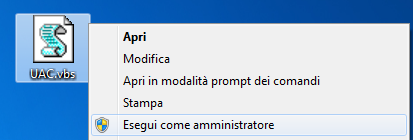
Testato su: Windows 2008, Windows 7 e Windows Vista
Windows Registry Editor Version 5.00

[HKEY_CLASSES_ROOT\VBSFile\Shell\runas]
"HasLUAShield"=""

[HKEY_CLASSES_ROOT\VBSFile\Shell\runas\command]
@=hex(2):22,00,43,00,3a,00,5c,00,57,00,69,00,6e,00,64,00,6f,00,77,00,73,00,5c,\
  00,53,00,79,00,73,00,74,00,65,00,6d,00,33,00,32,00,5c,00,57,00,53,00,63,00,\
  72,00,69,00,70,00,74,00,2e,00,65,00,78,00,65,00,22,00,20,00,22,00,25,00,31,\
  00,22,00,20,00,25,00,2a,00,00,00